
Tag: Tools

  • The Lab: why marketing should build its own tools

    The Lab: why marketing should build its own tools

    For most of my career, getting a new tool in marketing looked like this: write a requirements document, wait for an IT slot, wait for a budget, get something six months later that almost does what you needed. Or buy a SaaS product that does 80% of it and makes the remaining 20% impossible.

    A month ago we tried something else. We started what we call the Lab: an internal portal where the marketing and sales teams build their own tools with AI coding agents. None of us are developers. I know basic HTML and CSS; my colleagues know about as much.

    Four weeks in, the Lab has a daily chat quality report, a documentation gap finder, a market metrics page, a watch list for customer tickets that went quiet, a social media analyser, and a coaching tool for our seminar venue. Most of these took a day or two to get to a first useful version.

    This post is about how that works, and why the most important ingredient is not the AI model.

    The agent is the easy part

    Modern coding agents are very good at writing code. That’s not the bottleneck anymore. The bottleneck is that the agent knows nothing about your business. It doesn’t know what a “qualified lead” means in your company, which CRM field holds the partner tier, why the Instagram numbers from last quarter look strange, or that your support team closes tickets in a particular way.

    Give an agent a vague task and no context, and you get a generic dashboard that looks great and answers the wrong question. Give it the right context, and it builds something that feels like it was made by someone who has worked with you for years.

    So the real work in the Lab is not prompting. It’s building context.

    Three kinds of context

    1. What we know: plain Markdown files. Everything the agents need to understand lives as text files. I keep my own knowledge in an Obsidian vault: who we are, how we talk about our products, brand guidelines written for AI agents instead of designers, definitions of our metrics. Meeting summaries flow into the vault automatically every evening.

    Every project repository has one entry file, AGENTS.md, that every agent reads first, whether it’s Claude Code, Codex or something else. Next to it is a docs/ folder with decisions and lessons, each with a date and a reason. When an agent or a human learns something non-obvious, it gets written there. Not in a chat. Not in one tool’s memory. In the repo, where the next agent will find it.

    One rule turned out to matter a lot: every definition lives in exactly one place. When I cleaned up my vault in August, I found our brand colours defined in six places and one process described in nine. Agents will happily pick whichever version they find first.

    2. What’s happening: live connections to our systems. Context also means data. Through MCP servers (the “USB ports” that let AI agents talk to other software) and APIs, the agents can read our CRM, our help desk, our live chat, our social media analytics and our product database. A tool that shows “active partners per market” doesn’t use an export from last month. It queries the CRM when it runs.

    That’s also how one of our most useful pages came about. The same metric was circulating in slides with three different definitions. Now there’s one definition, written down once, and the tool calculates it live. The discussion moved from “whose number is right” to “what do we do about it”.

    3. What went wrong: lessons written into the tools. Every skill and every tool carries its own list of traps. For example: “never let an AI sub-agent pull tickets from the help desk, the filters get lost and you get a million results instead of a few hundred.” These notes look boring. They’re the reason the second run of a tool is better than the first.

    What we’ve actually built

    A few examples, to make this concrete:

    • Chat reports. Every live chat from the day before is read and graded by an AI: was it answered, how long did the customer wait, was a sales opportunity missed, was the customer sent away too early. The full transcript sits next to the grade, so anyone can check.
    • Documentation gaps. Closed support tickets are compared with our public knowledge base. Whatever support had to explain in writing is probably missing from the docs. The tool proposes the text to add.
    • Social analyser. KPIs across our brand accounts, sentiment for every comment and DM, a list of people still waiting for an answer, and content ideas that link back to the real posts and comments they came from. A marketing colleague built most of it, not me.
    • Ticket watch. Open tickets where a customer is waiting and nobody has replied in days.
    • Venue coaching. Enquiries for our seminar venue that didn’t turn into bookings, why, and what they would have been worth.

    None of these are sophisticated software. They are small, specific, and built by the people who use them. That’s the point.
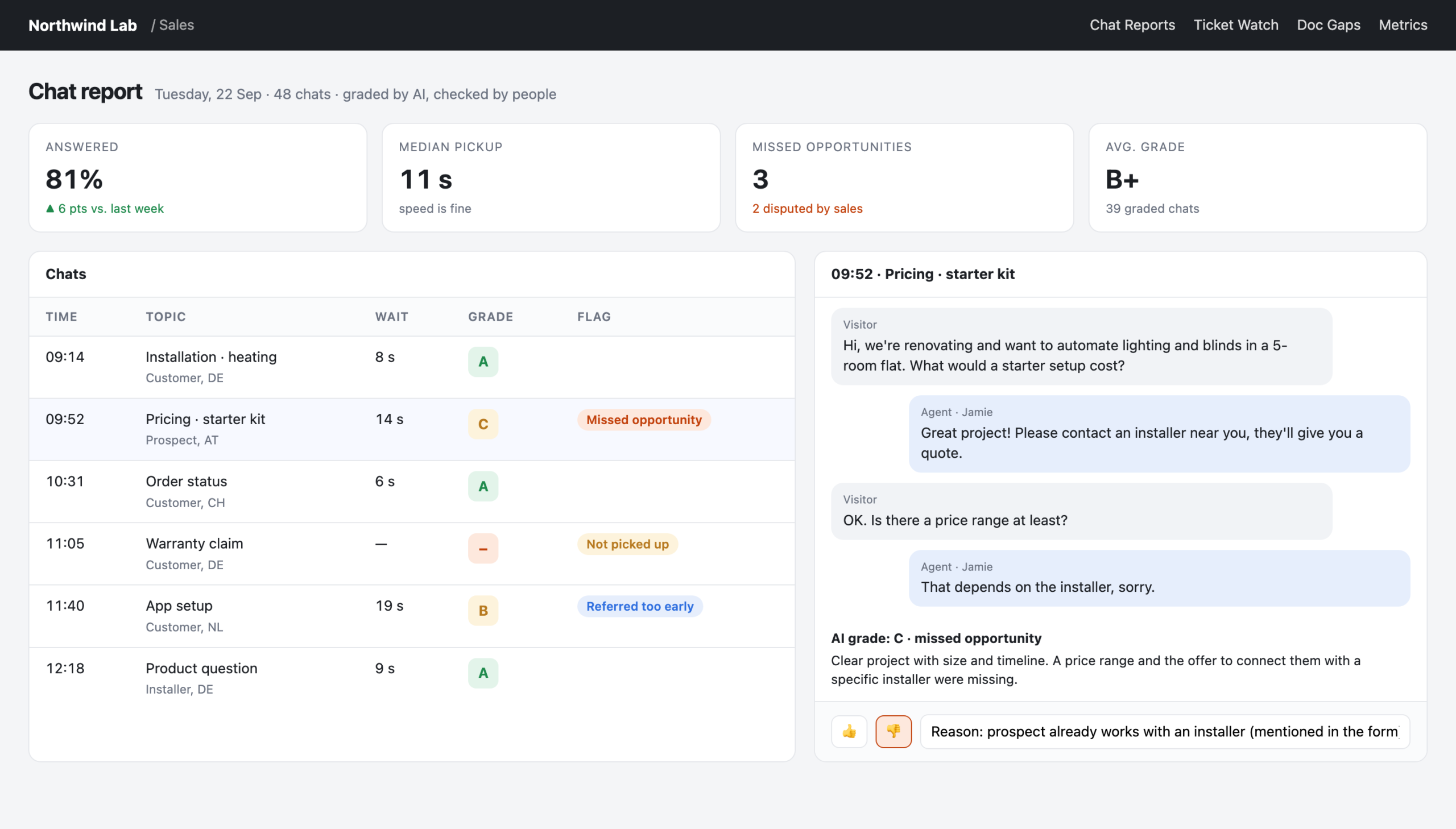
    Chat report: AI-graded chats with the transcript next to the grade
    Reconstructed view with made-up data: the real tool looks like this, but every name and number here is invented.

    How teams stay independent (from IT, and from each other)

    Each team gets its own zone in the portal: its own small app, its own path, its own deploy. If marketing breaks something, it breaks marketing’s zone, not the whole portal. A new colleague gets an invitation and a “copy prompt” button. The prompt tells their own AI agent to clone the project, read AGENTS.md and work through the onboarding checklist. The knowledge stays in the repo; the prompt only points there.

    Everything runs on Cloudflare with a login in front, so nothing is public and nobody had to build a login system. Viewers just need a company email address.

    We looked at the alternatives. A BI tool with per-user pricing and no way to enter data. A platform product for multi-tenant apps that cost more than it was worth for three teams. Separate repositories per team. We ended up with the simplest option that works: one repository, several zones, agreement instead of enforcement.

    Is this a threat to IT?

    No. IT still runs the systems of record, security and everything that has to be rock-solid. What changes is the long tail: the hundreds of small reports, checks and helpers that were never important enough for an IT project but that make a real difference to a marketing team’s week.

    For those, the old answer was “live without it” or “build it in Excel”. The new answer is: build it yourself, and give your agent the context it needs.

    Where to start

    If you want to try this in your team:

    1. Write down what you know. Start with one Markdown file: who you are, what your metrics mean, what your tone of voice is. Keep every definition in one place.
    2. Connect one system. Pick the one you look at most (CRM, help desk, social analytics) and connect it through an MCP server or API.
    3. Build one small tool for one real question. Not a dashboard. A question, like “which customers are waiting for an answer right now?”
    4. Write down what went wrong, with a date. That file will become your most valuable asset.

    The tools are the visible part. The context is what you’re really building.
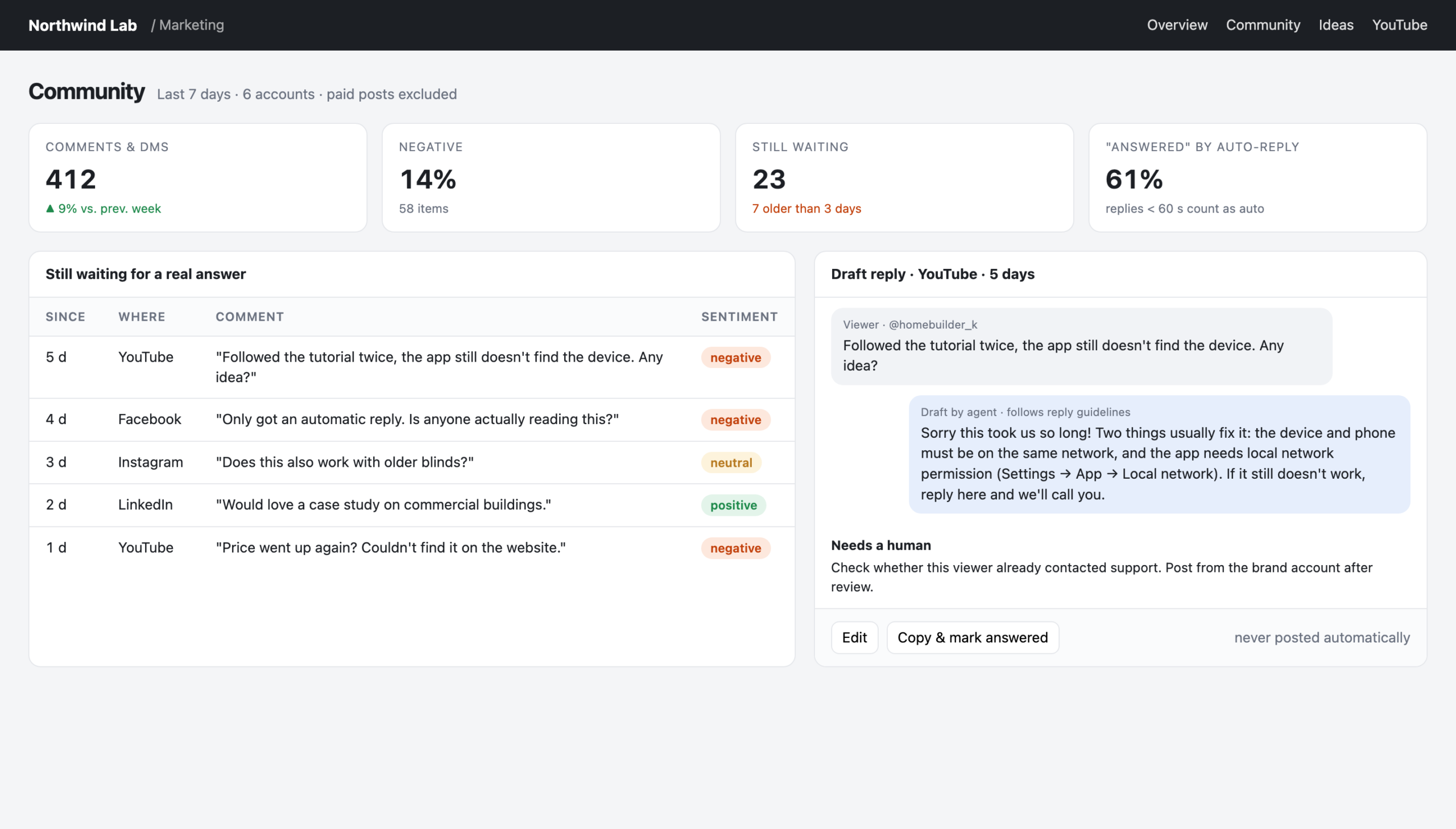
    Social analyser: people still waiting for a real answer, with a drafted reply
    Reconstructed view with made-up data: the real tool looks like this, but every name and number here is invented.
  • I can’t code. I host everything on Cloudflare anyway.

    I can’t code. I host everything on Cloudflare anyway.

    Let me start with a confession: I am not a developer. I can write basic HTML, I can make a page look decent with CSS, and I know roughly what a database is. That’s it.

    Still, as of this week, I run six sites and small apps on my own domains. There’s a personal finance dashboard with a database behind a login. There’s a tool that collects charging sessions from a family’s wallbox and produces monthly receipts. There are two websites for local clubs, a personal landing page, and the blog you’re reading right now. All of them live on one Cloudflare account.

    I didn’t write the code. AI coding agents did, mainly Claude Code and Codex. What I did was decide what I wanted, check what came back, and pick a hosting setup that someone like me can actually understand and keep running. This post is about that last part, because it matters more than people think.

    The real problem isn’t writing code

    If you’re a marketer playing with AI agents, you quickly notice that getting code written is no longer the hard part. You describe what you want, and a few minutes later something works on your laptop.

    The hard part comes next. Where does it run? Who patches the server? What happens when it breaks at 11 pm? How do I stop the whole internet from seeing my finance data? Classic web hosting answers those questions with things I can’t do: SSH into servers, configure Nginx, renew certificates, update PHP, manage database backups.

    What I needed was a setup where the agent can do the work and I can still understand what’s going on.

    What I actually use

    Everything follows the same simple pattern:

    • Workers with static assets. Each site is a folder of plain HTML, CSS and a bit of JavaScript, plus a small script (a “Worker”) that runs on Cloudflare’s network. No server I have to maintain.
    • D1 for the databases. It’s SQLite under the hood, which means the data is one file I could download and open myself if I wanted to.
    • R2 for files, such as the photo uploads on a club site or the images on this blog.
    • Cloudflare Access to put a login in front of anything private. My finance app is only reachable after an email code to my own address, and I didn’t have to build a login system to get that.
    • DNS in the same place. The domains already sit at Cloudflare, so connecting a new subdomain to a Worker is one line in a config file.

    And the most important bit: all of it is described in files inside the project. There’s a config file per project that says which database, which storage bucket and which domain it uses. Deploying means running one command. No clicking around in dashboards that nobody remembers a week later.

    Why this fits a non-developer so well

    One place, one bill, mostly free. My sites don’t get millions of visitors. The free tier covers almost everything, and if I ever outgrow it, the paid Workers plan starts at five dollars a month. I don’t have five hosting providers with five logins and five invoices.

    Nothing to patch. There’s no operating system under my sites that I’m responsible for. That alone removes the scariest class of problems for someone like me.

    Agents understand it. This is the part that surprised me. Because the whole setup is files (a config, a database schema, a folder of pages), an AI agent can read it, change it and deploy it. When I ask “add a page that shows last month’s charging sessions”, the agent knows where the database is, how it’s structured and how to ship the change. A hosting setup that lives in a web dashboard is invisible to the agent. A setup that lives in files is something the agent can work with.

    Rollback is built in. Every deploy is a version. When something breaks, going back takes a single command. For two club websites I even left the old hosting running in parallel: the Worker simply sits in front of it. If I remove one route, the old site is live again. That’s the kind of safety net you want when you’re not sure you know what you’re doing.

    Security I didn’t have to build. Putting Access in front of an app took one setup step. Building a secure login myself (or rather, trusting an agent to build one) would have been a much bigger risk.

    What went wrong (so you don’t have to repeat it)

    It isn’t magic. A few things bit me, and all of them are now written down in the projects so that neither I nor the next agent falls for them again:

    • Two accounts, one mistake. I have a work Cloudflare account and a private one on the same laptop. An agent once created a database in the wrong account because the tool it used was connected to the work account. Now every private project has the private account ID written into its config, so a deploy to the wrong account simply fails.
    • “Auto deploy” didn’t deploy. One site was supposed to redeploy on every push to GitHub. It silently stopped doing that. The fix wasn’t technical, it was a habit: after a change, check which version is live.
    • A login that wasn’t a login. On one app, Cloudflare served the HTML files directly, before my login check ever ran. The data behind it was protected, but the page itself wasn’t. One setting (“run the Worker first”) fixed it. You only find this kind of thing by testing like an outsider.
    • Error messages lie sometimes. Once the deploy tool claimed I wasn’t logged in. I was. A plugin had created a folder that confused it. An agent found that in minutes. I would have needed days.

    The bigger point

    For decades, “I’m not technical” meant “I need someone from IT or an agency for that”. With AI agents, that’s changing, but only if the platform underneath is simple enough that you can keep an overview. For me, that platform is Cloudflare. For you, it might be something else.

    My rule of thumb: pick a platform where your whole setup can be written down in plain files. Then both you and your agents can read it. That’s what turns “the agent wrote me some code” into “I run this thing myself”.

    This blog, by the way, is my latest experiment. It runs on EmDash, a new open-source CMS that runs on Cloudflare, and I’m testing it as a WordPress alternative. More on that once I’ve lived with it for a while.