Tag: Customer Service

  • LLMs read your comment section

    LLMs read your comment section

    Earlier this year I had a conversation with people from a large software company that stuck with me. Their observation: when you ask an AI assistant about a brand, the answer leans surprisingly heavily on public sentiment. Forum threads, review sites, the comments under social posts. Not the carefully written product pages. Not the press releases.

    Think about what that means for a moment. For years, a critical comment under an Instagram post was a small customer service issue. Someone is annoyed, maybe you reply, maybe you don’t, and a week later nobody remembers it.

    Now that comment is training material for how machines describe you.

    The public picture is skewed

    Here’s the uncomfortable part. Most brands with a loyal community have a lopsided public footprint:

    • The happy customers talk in closed places. Partner portals, private groups, internal forums, direct conversations with their contact person. Lots of goodwill, almost none of it visible to a crawler.
    • The unhappy customers talk in public. A review site, a comment under your latest video, a thread in an open forum. That’s where people go when they feel they aren’t being heard anywhere else.

    So the public picture is often worse than reality. And the public picture is the one that AI assistants see.

    You can’t fix that with more ads or a better About page. You fix it where it happens: in the comments.

    Social listening becomes narrative work

    Social listening used to be a reporting job. Count mentions, measure sentiment, put a chart in the monthly deck. Useful, but passive.

    In the AI age, it becomes narrative work. The question isn’t just “how do people feel about us?” but “what story does the public record tell about us, and are we part of that story?”

    That changes what a good reply looks like.

    The canned reply makes it worse. “We’re sorry to hear that, please contact our support team.” Everyone has seen this reply a hundred times. It tells the reader, and any machine reading along, that the problem is still unsolved and the brand didn’t engage with it.

    The specific reply changes the record. Answer the actual problem, in public, in a few sentences. If it’s a known issue, say what the fix is. If it needs a conversation, say who will call and when. The next person with the same problem finds the answer right there, and so does the AI.

    Then close the loop. When someone’s problem has really been solved, it’s fair to ask whether they’d update their review or add a comment. Many will, because they were never angry at the brand, they were angry at being ignored.

    Where AI agents help

    This is a lot of work if you do it by hand across several accounts and platforms. It’s exactly the kind of work where agents shine, as long as a human stays in charge.

    Here’s the setup I’ve been building up over the last few months:

    1. A weekly sentiment run. An agent pulls comments and messages from all brand accounts, scores the sentiment of each one and groups them by topic.
    2. A “still waiting” list. Everyone who asked a question or complained and hasn’t had a real answer yet. Not a chart. A list of people. One lesson here: most “answered” messages in our analytics turned out to be automatic replies within seconds. We now treat those as unanswered.
    3. Drafted replies. For each open item, the agent drafts a reply that follows our own guidelines: tone of voice, what we say about known issues, when to hand over to support. The drafts are starting points, not autopilot.
    4. A human checks and posts. Always. The agent doesn’t have the context to know whether this customer already talked to someone yesterday, and it shouldn’t speak for the brand on its own.
    5. Actively collect good reviews. A few new reviews every week from customers who are clearly happy, so the public picture isn’t defined only by the loudest few.

    None of this is sophisticated technology. It’s a routine, and the agent makes the routine cheap enough to actually keep up.
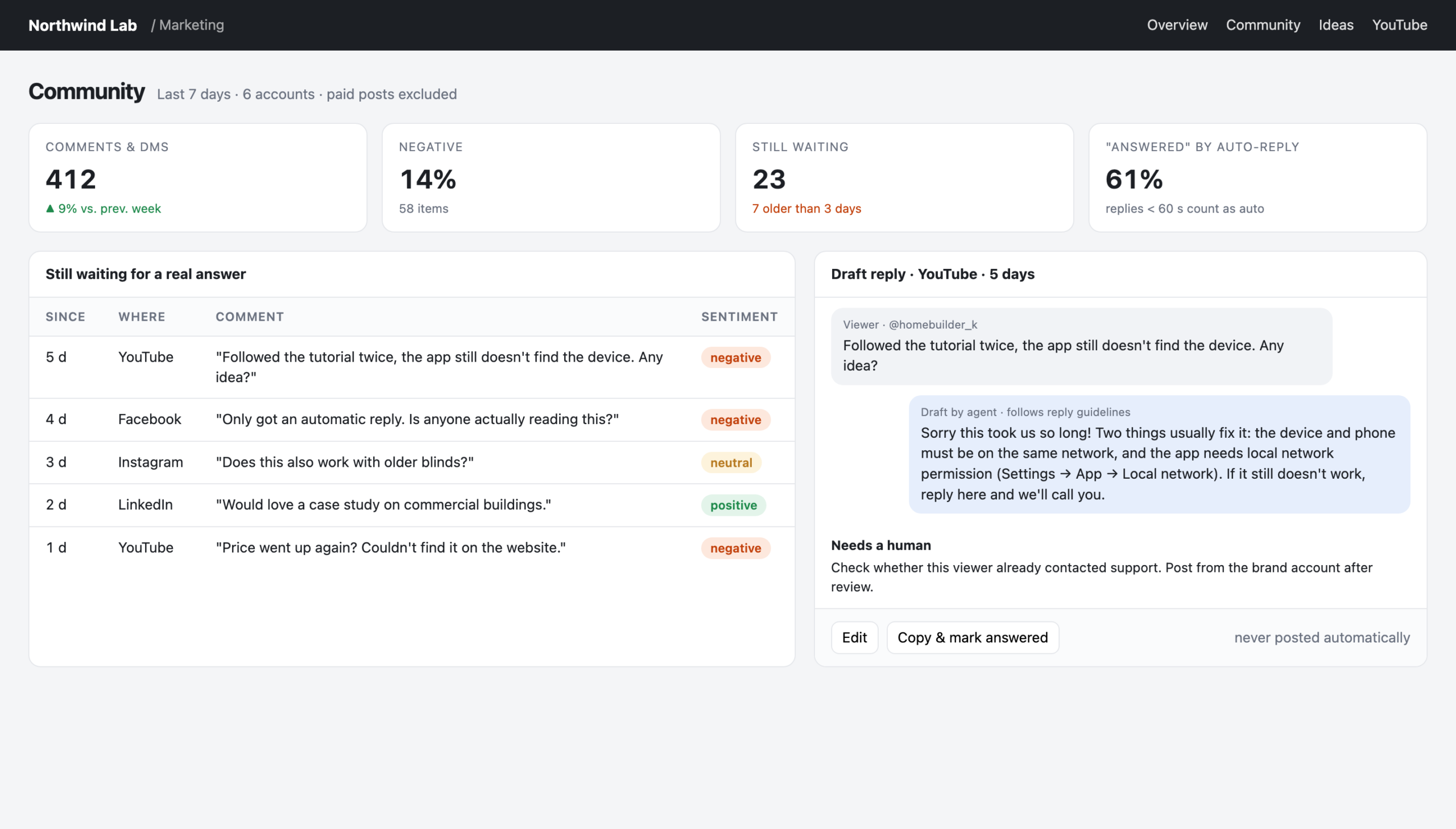
    Community view: who is still waiting, and a drafted reply for a human to check
    Reconstructed view with made-up data: the real tool looks like this, but every name and number here is invented.

    What not to do

    A few things I’d avoid:

    • Don’t let the agent post on its own. One badly judged automatic reply to an angry customer, in public, undoes a lot of careful work.
    • Don’t argue in public. If a review is unfair, state the facts once, calmly, and offer to talk. The reader decides who looks reasonable.
    • Don’t fake it. Paid or invented reviews are not a shortcut. They’re a liability, for people and machines alike.
    • Don’t confuse volume with coverage. Ten fast replies to easy questions don’t make up for one unanswered complaint that sits there for a month.

    The short version

    AI assistants learn about your brand from what’s public. What’s public is often skewed towards the unhappy few, because the happy many talk elsewhere.

    So treat every public comment as part of your brand’s story. Answer the real problem, in public, like a human. Use agents to find everything that’s waiting and to draft the replies. Keep a person on the send button.

    Every comment is a customer. And, these days, every comment is also a source.
  • Measure the answer, not the question

    Measure the answer, not the question

    Every company sits on a huge pile of unread market research. It’s called the support inbox. Every live chat, every ticket, every email is a customer telling you in their own words what they don’t understand, what they want, and where your product or your content lets them down.

    Marketing rarely reads it. Not because nobody cares, but because nobody has time to read thousands of conversations. With AI, that excuse is gone. An agent can read every conversation from yesterday before you’ve had your coffee.

    We’ve been doing this for a few weeks now. Here’s what we learned.

    The trick: look at what support had to explain

    Our first idea was obvious: take the customer questions, check whether our knowledge base answers them, and list the gaps. It didn’t work well. Customers ask vague questions in their own words. “It doesn’t work anymore” doesn’t map to any article.

    The breakthrough was to flip it around. Don’t measure the question. Measure the answer. Look at what the support agent had to write to solve the case. If support had to explain something in detail, in writing, that explanation is exactly what’s missing from the documentation.

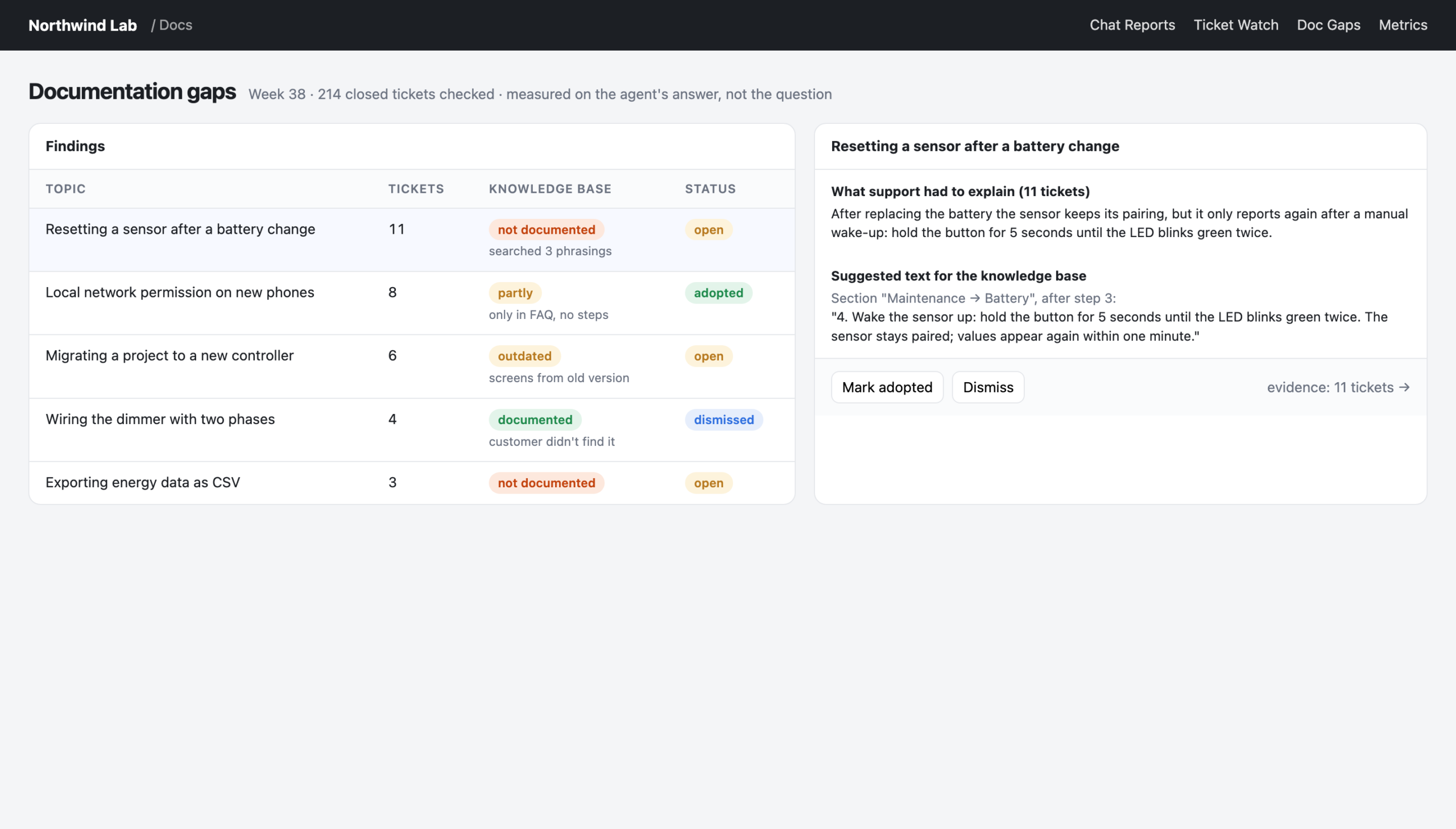
    With that change, the gap analysis became useful overnight. For every closed ticket, the tool compares the support agent’s answer with our knowledge base. It uses plain keyword search on a local copy of all articles, which is fast and needs no AI at all. Where there’s a real gap, it drafts the text to add. The documentation team marks each finding as open, adopted or dismissed.

    One rule keeps it honest: a topic only counts as “not documented” if the search came up empty with at least two different phrasings.

    Documentation gaps found in support answers, with suggested text
    Reconstructed view with made-up data: the real tool looks like this, but every name and number here is invented.

    Finding 1: speed was never the problem

    When we started grading our live chats, I expected slow response times. Everybody complains about waiting in chat.

    Wrong. When someone picked up a chat, they picked it up within seconds. The problem was that too many chats weren’t picked up at all. It was about coverage, not speed.

    That’s a completely different problem with a completely different fix: shift planning, not training. Once it was visible every morning, the share of chats that got answered went up noticeably within a few weeks. Nobody had to be told to hurry up. The number just had to be on the table.

    Finding 2: the silence after the first reply

    We saw the same pattern in support tickets. We started by reading a random sample of a hundred closed tickets, to see the reality before building anything. First responses were fast. But a meaningful share of tickets were closed without a real answer to the customer, and some sat silent for almost two weeks in the middle of the conversation.

    The speed was right. The silence afterwards wasn’t.

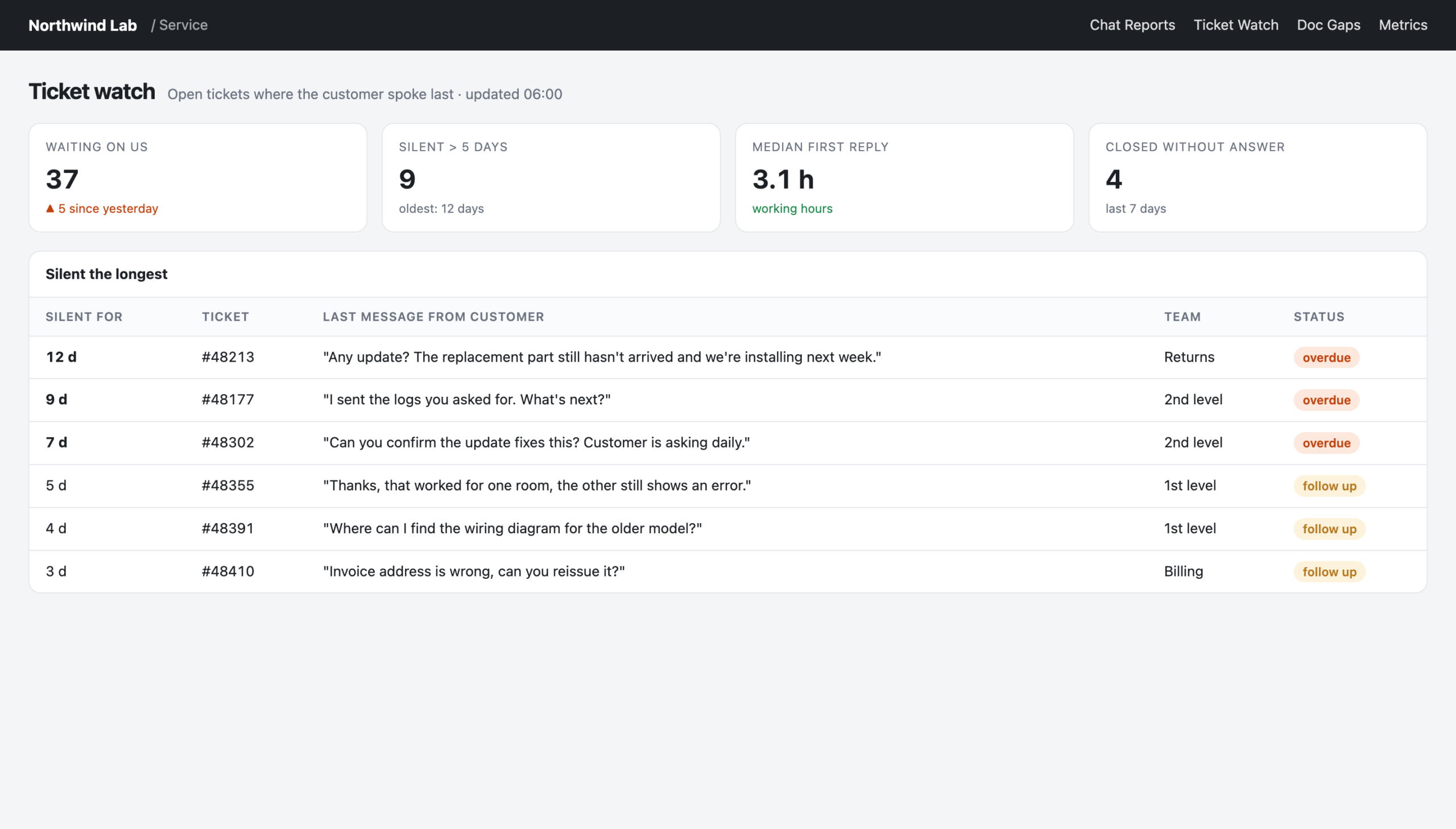
    So we built a small watch list: open tickets where the last message is from the customer and nobody has replied in days. It’s not an analysis, it’s a to-do list. It’s also one of the most-used pages we have.

    Ticket watch: open tickets where the customer spoke last
    Reconstructed view with made-up data: the real tool looks like this, but every name and number here is invented.

    Finding 3: “answered” doesn’t mean answered

    In our social media analysis we wanted to know how well we answer comments and direct messages. The analytics tool said: almost all of them.

    When we looked closer, most of those “answers” were automatic replies sent within a minute. A human had never looked at them. We now treat any brand reply within sixty seconds as an auto-reply and list the people who are still waiting for a real one.

    The lesson generalises: whenever a tool gives you a suspiciously good number, check how it was counted.

    Why this is marketing’s job

    You could argue this is all customer service. It isn’t only that. What customers ask in support is what they will search for before they buy. What support has to explain is what your website, your product pages and your content don’t explain. Where customers get stuck is where your messaging makes a promise the product experience doesn’t keep.

    It’s also the best content briefing you’ll ever get. Every repeated support explanation is a blog post, a video or a help article waiting to be written, and it comes with the customer’s exact wording.

    How to start

    1. Read a sample yourself first. Pick a hundred random conversations and read them. You’ll know what to measure afterwards, and you’ll recognise when the AI gets it wrong.
    2. Keep the full conversation next to every AI verdict. People need to be able to check.
    3. Measure the answer, not the question, if you’re looking for content gaps.
    4. Turn findings into lists, not charts. “These twelve customers are waiting” is more useful than a trend line.
    5. Be suspicious of good numbers. Check how they’re counted.

    Your customers are already telling you what to fix and what to write. The only new thing is that you can finally afford to listen to all of them.

  • Why chatbots rot

    Why chatbots rot

    A few years ago we had a support chatbot. It was expensive, it was built by a specialist vendor, and on launch day it worked well. A year later, people avoided it.

    Nothing had broken, technically. The bot still answered every question, quickly and politely. The problem was that more and more of the answers were wrong. Products had changed, processes had changed, the documentation had moved on. The bot hadn’t.

    That experience sets the bar for every chatbot we’ve built since. And it taught me the most important thing I know about them: a chatbot is not a technology project. It’s a content maintenance problem dressed up as one.

    How bots rot

    Classic chatbots are built from scripted answers. Someone writes a list of questions and the matching responses, the vendor trains a model to recognise the questions, and off it goes.

    From that day on, every change in your business creates a small gap. A new product version. A new return process. A price change. A feature that got renamed. Each gap is tiny. Nobody owns closing them, because the bot was a project and the project is finished.

    Six months later, the bot is confidently telling customers things that were true last spring. The customers notice before you do.

    What’s different with LLMs, and what isn’t

    Modern language models change one thing fundamentally: you don’t have to script answers anymore. You can point the bot at your documentation, and it answers from there. When the documentation changes, the answers change with it.

    That sounds like the rot problem is solved. It’s only moved.

    The bot is now exactly as good as the documentation it reads. If the docs are outdated, incomplete or written in words your customers don’t use, the bot will be too, just more fluently. Freshness of your knowledge base becomes the real KPI of your chatbot.

    What we do differently this time

    When we replaced the old vendor bot with a language-model-based assistant this year, we set a few rules.

    Human first. If someone from the team is online, the customer gets a person. The bot only answers when nobody is available, for example at night or on weekends. It’s a safety net, not a gatekeeper. We even deliberately launched one support channel without any AI at all, because the people using it needed a human more than an instant answer.

    One bot, one job. A bot that helps people learn the product and a bot that answers pre-sales questions need different sources, different tone and different boundaries. We keep them separate and give each its own name, so customers and the team know which one they’re talking to.

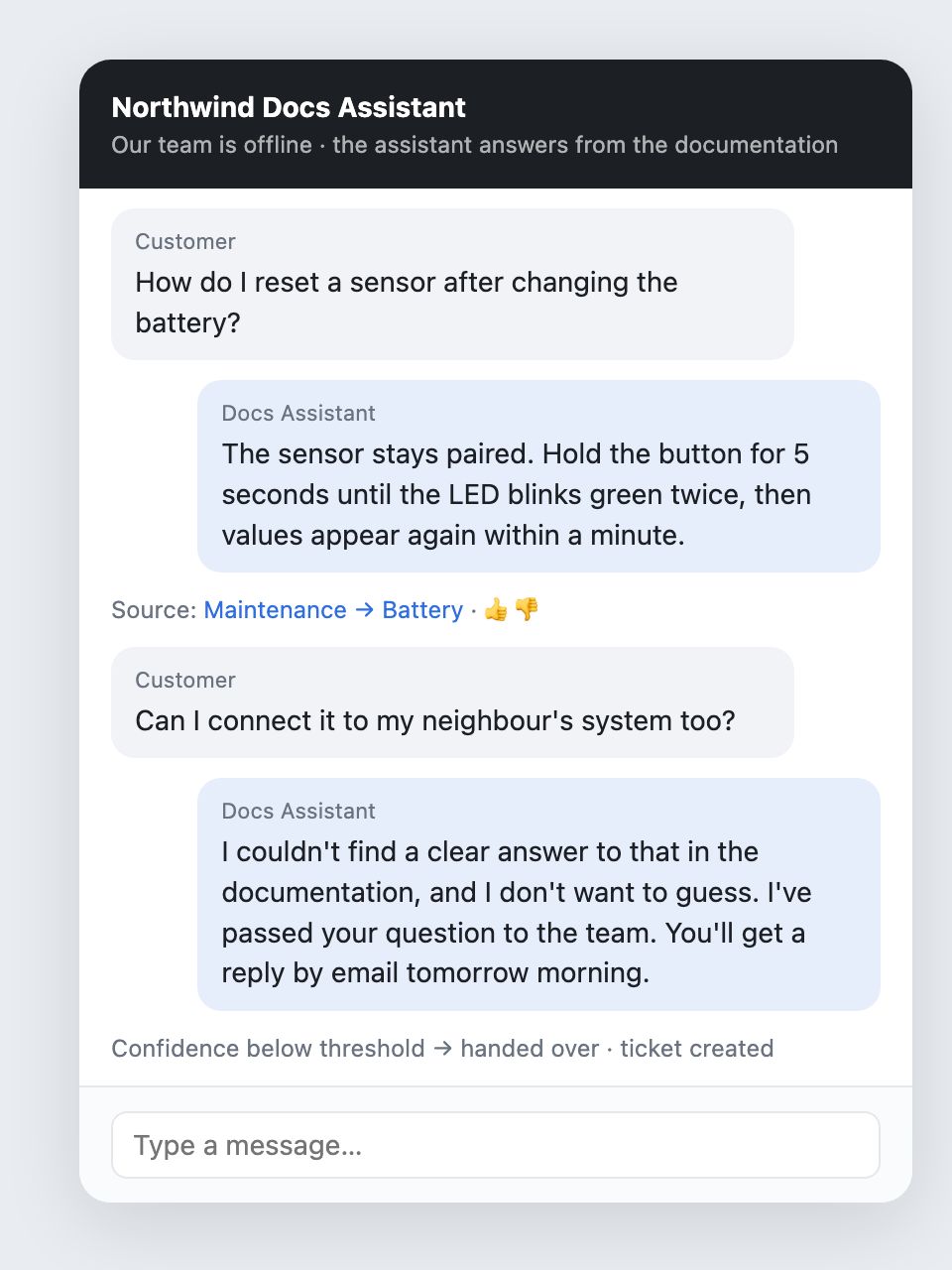
    Decline instead of guess. Before going live, we tested the documentation bot against 200 real support questions. Most answers were partially right, a few were wrong, and one was a proper hallucination. So the bot now has a confidence gate: if the documentation doesn’t clearly cover a question, it says so and hands over. I wrote more about this in Make your AI contradictable.

    The documentation bot answers with a source, and hands over when it isn't sure
    Reconstructed view with made-up data: the real tool looks like this, but every name and number here is invented.

    Speak the customer’s language. Customers describe symptoms; documentation describes features. When we added the documentation’s own vocabulary to each search, the number of customer phrasings the bot could answer roughly doubled in our tests. That’s not a model improvement. It’s a content improvement.

    Every answer can be rated. Thumbs up, thumbs down, with a reason. The ratings don’t just improve the bot, they point at the articles that need work.

    The failure nobody expects

    One more story, because it’s the kind of thing you only learn by running a bot in production.

    On one of its first days, our bot suddenly made hundreds of calls to the chat system within seconds. The cause was a single configuration detail: the bot’s “I can’t help, let me forward you” answer was placed in a spot where the chat system treated it as a new question. The bot answered its own forwarding message, which triggered another forwarding message, and so on.

    Nothing bad happened to customers, and the fix was one line. But it’s a good reminder: a bot is a system that talks to other systems, and those systems have their own logic. Watch it closely in the first weeks.

    Who owns the bot?

    This is the question that decides whether a bot rots.

    The wrong answer is “the person who built it”. That person will move on to the next project, and the bot becomes an orphan.

    The right answer is “the team whose knowledge it serves”. In our case that’s the people who write and maintain the documentation, together with support. They see the thumbs down. They see which questions the bot declined. They fix the articles, and the bot gets better without anyone touching the bot itself.

    A checklist before you launch a bot

    1. Who keeps the knowledge current? Name a team, not a person.
    2. Human first or bot first? Decide deliberately, per channel.
    3. One job per bot. Separate bots for separate purposes.
    4. A confidence gate. Decline instead of guess.
    5. Ratings with reasons, routed to the people who own the content.
    6. Watch the first weeks closely. Bots talking to systems do surprising things.

    A chatbot doesn’t rot because the technology gets worse. It rots because nobody feels responsible for what it knows. Solve that, and the technology is the easy part.