Author: Florian

  • The Lab: why marketing should build its own tools

    The Lab: why marketing should build its own tools

    For most of my career, getting a new tool in marketing looked like this: write a requirements document, wait for an IT slot, wait for a budget, get something six months later that almost does what you needed. Or buy a SaaS product that does 80% of it and makes the remaining 20% impossible.

    A month ago we tried something else. We started what we call the Lab: an internal portal where the marketing and sales teams build their own tools with AI coding agents. None of us are developers. I know basic HTML and CSS; my colleagues know about as much.

    Four weeks in, the Lab has a daily chat quality report, a documentation gap finder, a market metrics page, a watch list for customer tickets that went quiet, a social media analyser, and a coaching tool for our seminar venue. Most of these took a day or two to get to a first useful version.

    This post is about how that works, and why the most important ingredient is not the AI model.

    The agent is the easy part

    Modern coding agents are very good at writing code. That’s not the bottleneck anymore. The bottleneck is that the agent knows nothing about your business. It doesn’t know what a “qualified lead” means in your company, which CRM field holds the partner tier, why the Instagram numbers from last quarter look strange, or that your support team closes tickets in a particular way.

    Give an agent a vague task and no context, and you get a generic dashboard that looks great and answers the wrong question. Give it the right context, and it builds something that feels like it was made by someone who has worked with you for years.

    So the real work in the Lab is not prompting. It’s building context.

    Three kinds of context

    1. What we know: plain Markdown files. Everything the agents need to understand lives as text files. I keep my own knowledge in an Obsidian vault: who we are, how we talk about our products, brand guidelines written for AI agents instead of designers, definitions of our metrics. Meeting summaries flow into the vault automatically every evening.

    Every project repository has one entry file, AGENTS.md, that every agent reads first, whether it’s Claude Code, Codex or something else. Next to it is a docs/ folder with decisions and lessons, each with a date and a reason. When an agent or a human learns something non-obvious, it gets written there. Not in a chat. Not in one tool’s memory. In the repo, where the next agent will find it.

    One rule turned out to matter a lot: every definition lives in exactly one place. When I cleaned up my vault in August, I found our brand colours defined in six places and one process described in nine. Agents will happily pick whichever version they find first.

    2. What’s happening: live connections to our systems. Context also means data. Through MCP servers (the “USB ports” that let AI agents talk to other software) and APIs, the agents can read our CRM, our help desk, our live chat, our social media analytics and our product database. A tool that shows “active partners per market” doesn’t use an export from last month. It queries the CRM when it runs.

    That’s also how one of our most useful pages came about. The same metric was circulating in slides with three different definitions. Now there’s one definition, written down once, and the tool calculates it live. The discussion moved from “whose number is right” to “what do we do about it”.

    3. What went wrong: lessons written into the tools. Every skill and every tool carries its own list of traps. For example: “never let an AI sub-agent pull tickets from the help desk, the filters get lost and you get a million results instead of a few hundred.” These notes look boring. They’re the reason the second run of a tool is better than the first.

    What we’ve actually built

    A few examples, to make this concrete:

    • Chat reports. Every live chat from the day before is read and graded by an AI: was it answered, how long did the customer wait, was a sales opportunity missed, was the customer sent away too early. The full transcript sits next to the grade, so anyone can check.
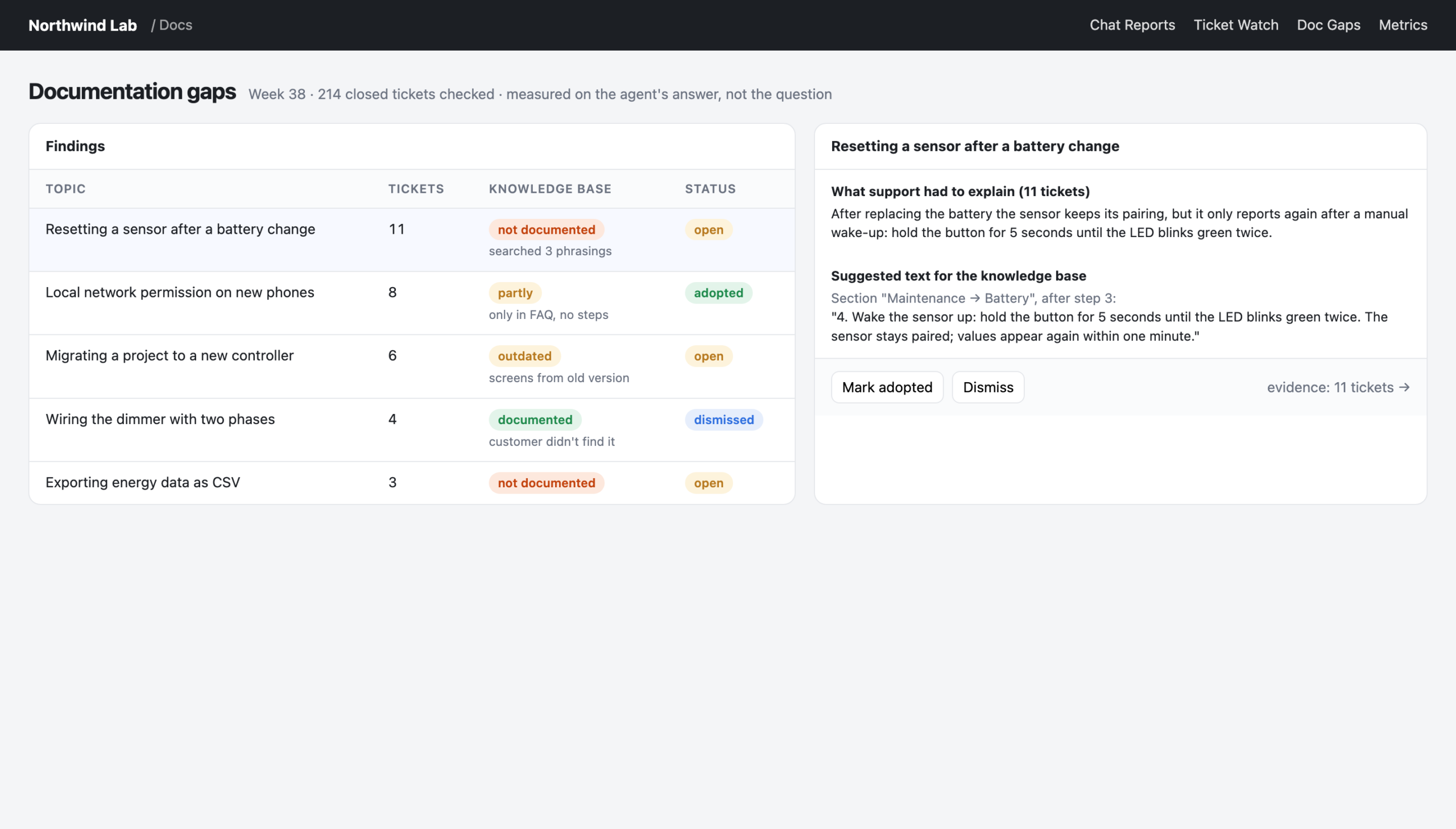
    • Documentation gaps. Closed support tickets are compared with our public knowledge base. Whatever support had to explain in writing is probably missing from the docs. The tool proposes the text to add.
    • Social analyser. KPIs across our brand accounts, sentiment for every comment and DM, a list of people still waiting for an answer, and content ideas that link back to the real posts and comments they came from. A marketing colleague built most of it, not me.
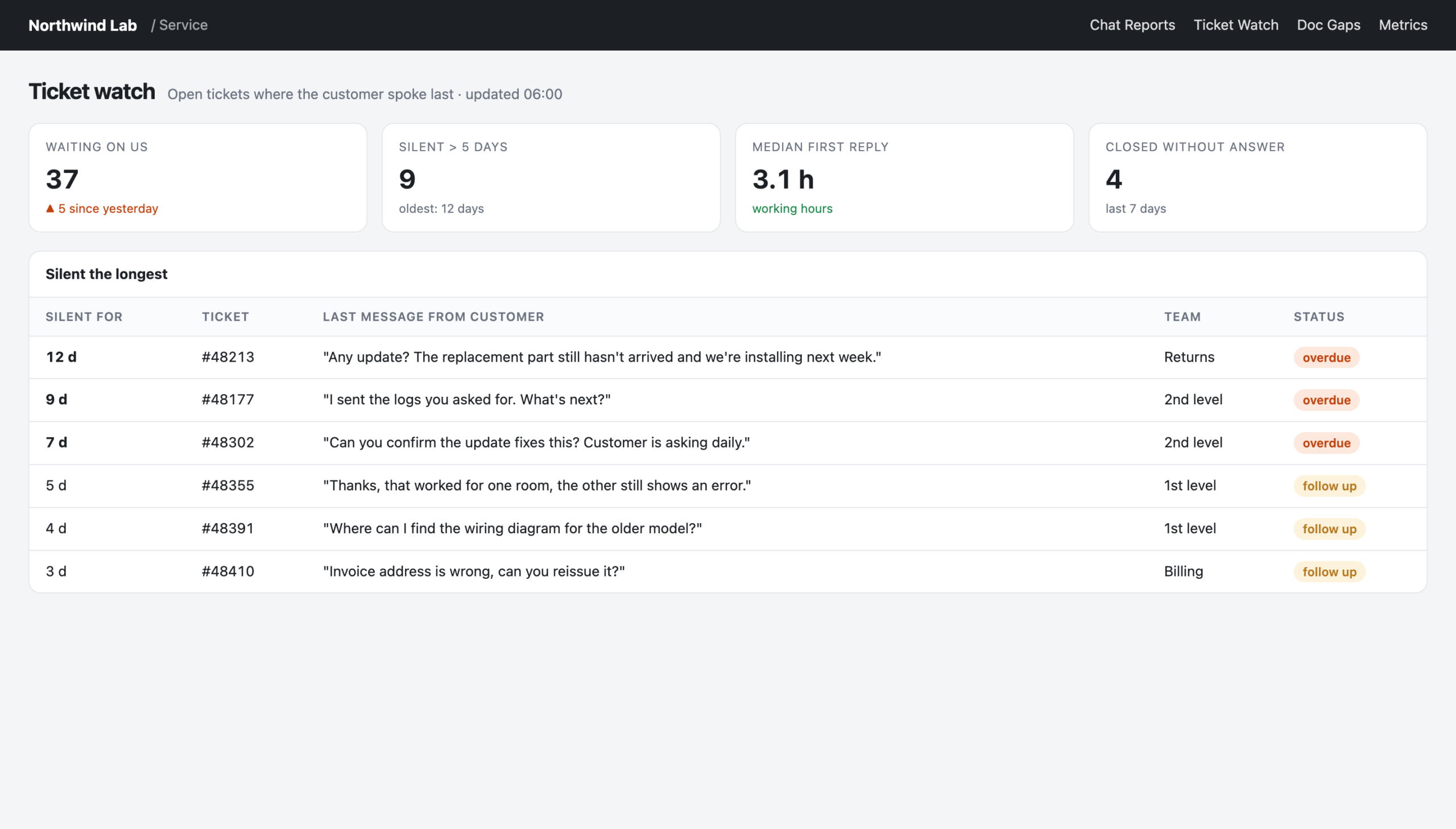
    • Ticket watch. Open tickets where a customer is waiting and nobody has replied in days.
    • Venue coaching. Enquiries for our seminar venue that didn’t turn into bookings, why, and what they would have been worth.

    None of these are sophisticated software. They are small, specific, and built by the people who use them. That’s the point.
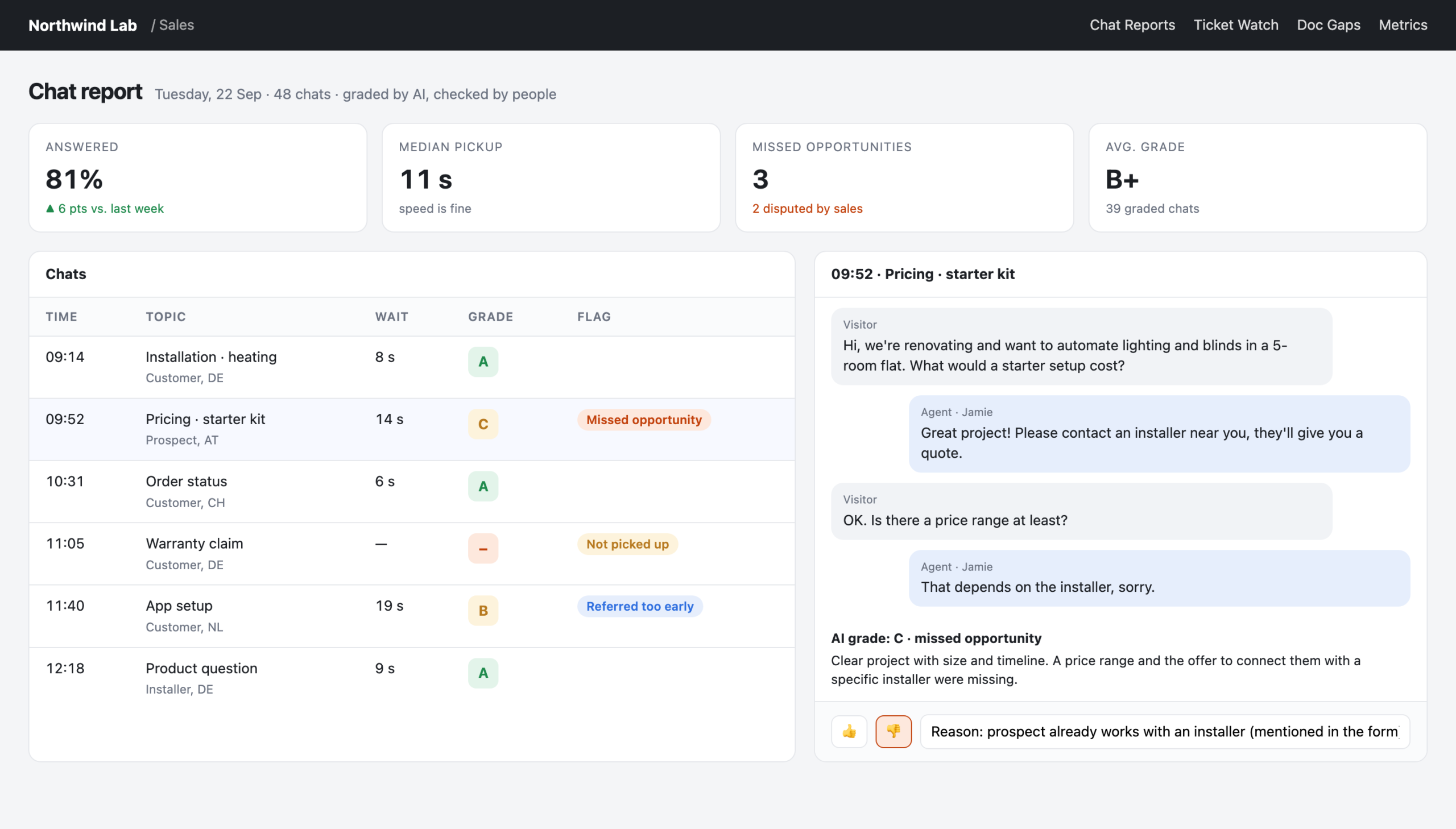
    Chat report: AI-graded chats with the transcript next to the grade
    Reconstructed view with made-up data: the real tool looks like this, but every name and number here is invented.

    How teams stay independent (from IT, and from each other)

    Each team gets its own zone in the portal: its own small app, its own path, its own deploy. If marketing breaks something, it breaks marketing’s zone, not the whole portal. A new colleague gets an invitation and a “copy prompt” button. The prompt tells their own AI agent to clone the project, read AGENTS.md and work through the onboarding checklist. The knowledge stays in the repo; the prompt only points there.

    Everything runs on Cloudflare with a login in front, so nothing is public and nobody had to build a login system. Viewers just need a company email address.

    We looked at the alternatives. A BI tool with per-user pricing and no way to enter data. A platform product for multi-tenant apps that cost more than it was worth for three teams. Separate repositories per team. We ended up with the simplest option that works: one repository, several zones, agreement instead of enforcement.

    Is this a threat to IT?

    No. IT still runs the systems of record, security and everything that has to be rock-solid. What changes is the long tail: the hundreds of small reports, checks and helpers that were never important enough for an IT project but that make a real difference to a marketing team’s week.

    For those, the old answer was “live without it” or “build it in Excel”. The new answer is: build it yourself, and give your agent the context it needs.

    Where to start

    If you want to try this in your team:

    1. Write down what you know. Start with one Markdown file: who you are, what your metrics mean, what your tone of voice is. Keep every definition in one place.
    2. Connect one system. Pick the one you look at most (CRM, help desk, social analytics) and connect it through an MCP server or API.
    3. Build one small tool for one real question. Not a dashboard. A question, like “which customers are waiting for an answer right now?”
    4. Write down what went wrong, with a date. That file will become your most valuable asset.

    The tools are the visible part. The context is what you’re really building.
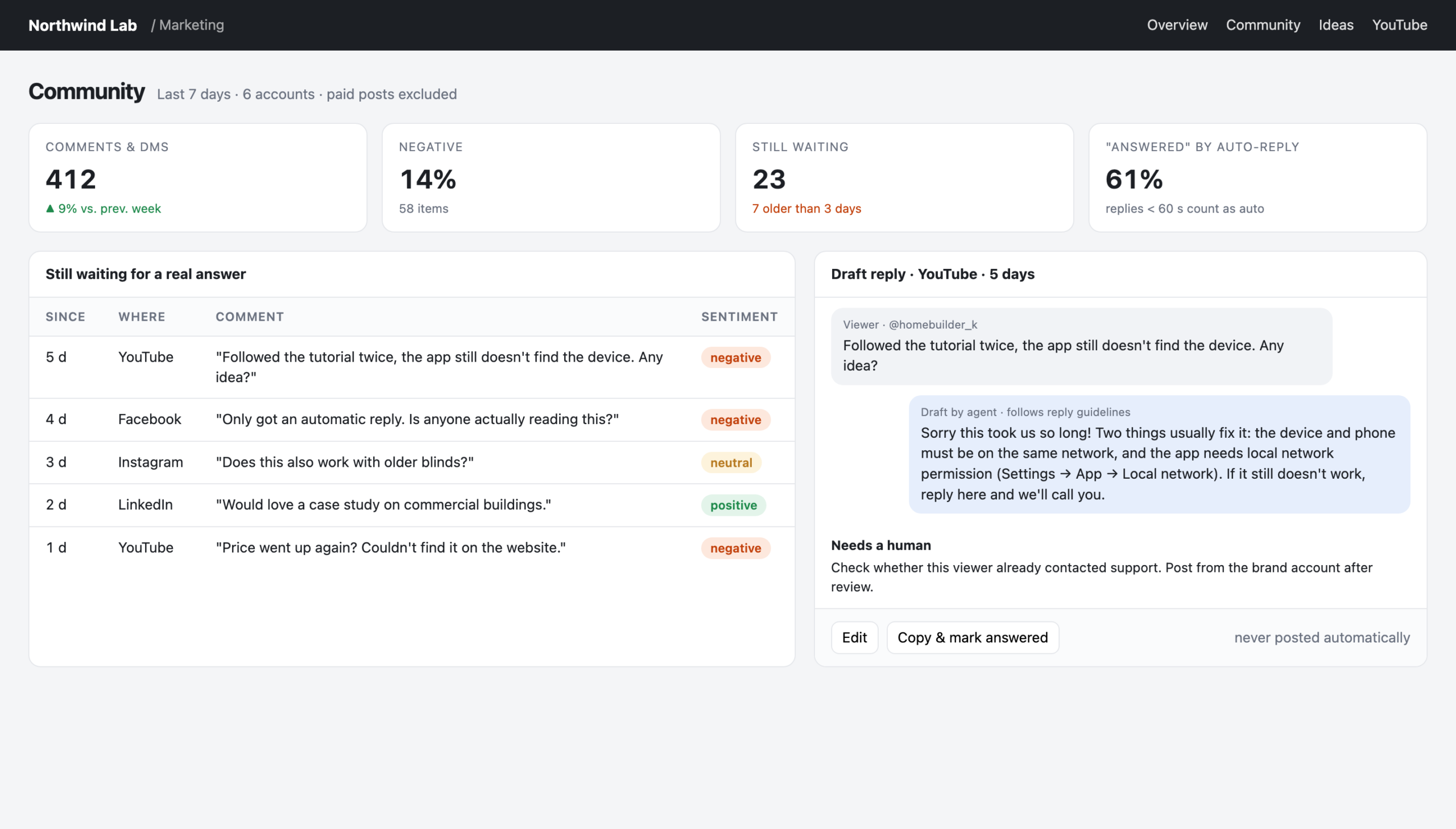
    Social analyser: people still waiting for a real answer, with a drafted reply
    Reconstructed view with made-up data: the real tool looks like this, but every name and number here is invented.
  • LLMs read your comment section

    LLMs read your comment section

    Earlier this year I had a conversation with people from a large software company that stuck with me. Their observation: when you ask an AI assistant about a brand, the answer leans surprisingly heavily on public sentiment. Forum threads, review sites, the comments under social posts. Not the carefully written product pages. Not the press releases.

    Think about what that means for a moment. For years, a critical comment under an Instagram post was a small customer service issue. Someone is annoyed, maybe you reply, maybe you don’t, and a week later nobody remembers it.

    Now that comment is training material for how machines describe you.

    The public picture is skewed

    Here’s the uncomfortable part. Most brands with a loyal community have a lopsided public footprint:

    • The happy customers talk in closed places. Partner portals, private groups, internal forums, direct conversations with their contact person. Lots of goodwill, almost none of it visible to a crawler.
    • The unhappy customers talk in public. A review site, a comment under your latest video, a thread in an open forum. That’s where people go when they feel they aren’t being heard anywhere else.

    So the public picture is often worse than reality. And the public picture is the one that AI assistants see.

    You can’t fix that with more ads or a better About page. You fix it where it happens: in the comments.

    Social listening becomes narrative work

    Social listening used to be a reporting job. Count mentions, measure sentiment, put a chart in the monthly deck. Useful, but passive.

    In the AI age, it becomes narrative work. The question isn’t just “how do people feel about us?” but “what story does the public record tell about us, and are we part of that story?”

    That changes what a good reply looks like.

    The canned reply makes it worse. “We’re sorry to hear that, please contact our support team.” Everyone has seen this reply a hundred times. It tells the reader, and any machine reading along, that the problem is still unsolved and the brand didn’t engage with it.

    The specific reply changes the record. Answer the actual problem, in public, in a few sentences. If it’s a known issue, say what the fix is. If it needs a conversation, say who will call and when. The next person with the same problem finds the answer right there, and so does the AI.

    Then close the loop. When someone’s problem has really been solved, it’s fair to ask whether they’d update their review or add a comment. Many will, because they were never angry at the brand, they were angry at being ignored.

    Where AI agents help

    This is a lot of work if you do it by hand across several accounts and platforms. It’s exactly the kind of work where agents shine, as long as a human stays in charge.

    Here’s the setup I’ve been building up over the last few months:

    1. A weekly sentiment run. An agent pulls comments and messages from all brand accounts, scores the sentiment of each one and groups them by topic.
    2. A “still waiting” list. Everyone who asked a question or complained and hasn’t had a real answer yet. Not a chart. A list of people. One lesson here: most “answered” messages in our analytics turned out to be automatic replies within seconds. We now treat those as unanswered.
    3. Drafted replies. For each open item, the agent drafts a reply that follows our own guidelines: tone of voice, what we say about known issues, when to hand over to support. The drafts are starting points, not autopilot.
    4. A human checks and posts. Always. The agent doesn’t have the context to know whether this customer already talked to someone yesterday, and it shouldn’t speak for the brand on its own.
    5. Actively collect good reviews. A few new reviews every week from customers who are clearly happy, so the public picture isn’t defined only by the loudest few.

    None of this is sophisticated technology. It’s a routine, and the agent makes the routine cheap enough to actually keep up.

    Community view: who is still waiting, and a drafted reply for a human to check
    Reconstructed view with made-up data: the real tool looks like this, but every name and number here is invented.

    What not to do

    A few things I’d avoid:

    • Don’t let the agent post on its own. One badly judged automatic reply to an angry customer, in public, undoes a lot of careful work.
    • Don’t argue in public. If a review is unfair, state the facts once, calmly, and offer to talk. The reader decides who looks reasonable.
    • Don’t fake it. Paid or invented reviews are not a shortcut. They’re a liability, for people and machines alike.
    • Don’t confuse volume with coverage. Ten fast replies to easy questions don’t make up for one unanswered complaint that sits there for a month.

    The short version

    AI assistants learn about your brand from what’s public. What’s public is often skewed towards the unhappy few, because the happy many talk elsewhere.

    So treat every public comment as part of your brand’s story. Answer the real problem, in public, like a human. Use agents to find everything that’s waiting and to draft the replies. Keep a person on the send button.

    Every comment is a customer. And, these days, every comment is also a source.

  • Measure the answer, not the question

    Measure the answer, not the question

    Every company sits on a huge pile of unread market research. It’s called the support inbox. Every live chat, every ticket, every email is a customer telling you in their own words what they don’t understand, what they want, and where your product or your content lets them down.

    Marketing rarely reads it. Not because nobody cares, but because nobody has time to read thousands of conversations. With AI, that excuse is gone. An agent can read every conversation from yesterday before you’ve had your coffee.

    We’ve been doing this for a few weeks now. Here’s what we learned.

    The trick: look at what support had to explain

    Our first idea was obvious: take the customer questions, check whether our knowledge base answers them, and list the gaps. It didn’t work well. Customers ask vague questions in their own words. “It doesn’t work anymore” doesn’t map to any article.

    The breakthrough was to flip it around. Don’t measure the question. Measure the answer. Look at what the support agent had to write to solve the case. If support had to explain something in detail, in writing, that explanation is exactly what’s missing from the documentation.

    With that change, the gap analysis became useful overnight. For every closed ticket, the tool compares the support agent’s answer with our knowledge base. It uses plain keyword search on a local copy of all articles, which is fast and needs no AI at all. Where there’s a real gap, it drafts the text to add. The documentation team marks each finding as open, adopted or dismissed.

    One rule keeps it honest: a topic only counts as “not documented” if the search came up empty with at least two different phrasings.

    Documentation gaps found in support answers, with suggested text
    Reconstructed view with made-up data: the real tool looks like this, but every name and number here is invented.

    Finding 1: speed was never the problem

    When we started grading our live chats, I expected slow response times. Everybody complains about waiting in chat.

    Wrong. When someone picked up a chat, they picked it up within seconds. The problem was that too many chats weren’t picked up at all. It was about coverage, not speed.

    That’s a completely different problem with a completely different fix: shift planning, not training. Once it was visible every morning, the share of chats that got answered went up noticeably within a few weeks. Nobody had to be told to hurry up. The number just had to be on the table.

    Finding 2: the silence after the first reply

    We saw the same pattern in support tickets. We started by reading a random sample of a hundred closed tickets, to see the reality before building anything. First responses were fast. But a meaningful share of tickets were closed without a real answer to the customer, and some sat silent for almost two weeks in the middle of the conversation.

    The speed was right. The silence afterwards wasn’t.

    So we built a small watch list: open tickets where the last message is from the customer and nobody has replied in days. It’s not an analysis, it’s a to-do list. It’s also one of the most-used pages we have.

    Ticket watch: open tickets where the customer spoke last
    Reconstructed view with made-up data: the real tool looks like this, but every name and number here is invented.

    Finding 3: “answered” doesn’t mean answered

    In our social media analysis we wanted to know how well we answer comments and direct messages. The analytics tool said: almost all of them.

    When we looked closer, most of those “answers” were automatic replies sent within a minute. A human had never looked at them. We now treat any brand reply within sixty seconds as an auto-reply and list the people who are still waiting for a real one.

    The lesson generalises: whenever a tool gives you a suspiciously good number, check how it was counted.

    Why this is marketing’s job

    You could argue this is all customer service. It isn’t only that. What customers ask in support is what they will search for before they buy. What support has to explain is what your website, your product pages and your content don’t explain. Where customers get stuck is where your messaging makes a promise the product experience doesn’t keep.

    It’s also the best content briefing you’ll ever get. Every repeated support explanation is a blog post, a video or a help article waiting to be written, and it comes with the customer’s exact wording.

    How to start

    1. Read a sample yourself first. Pick a hundred random conversations and read them. You’ll know what to measure afterwards, and you’ll recognise when the AI gets it wrong.
    2. Keep the full conversation next to every AI verdict. People need to be able to check.
    3. Measure the answer, not the question, if you’re looking for content gaps.
    4. Turn findings into lists, not charts. “These twelve customers are waiting” is more useful than a trend line.
    5. Be suspicious of good numbers. Check how they’re counted.

    Your customers are already telling you what to fix and what to write. The only new thing is that you can finally afford to listen to all of them.

  • Why chatbots rot

    Why chatbots rot

    A few years ago we had a support chatbot. It was expensive, it was built by a specialist vendor, and on launch day it worked well. A year later, people avoided it.

    Nothing had broken, technically. The bot still answered every question, quickly and politely. The problem was that more and more of the answers were wrong. Products had changed, processes had changed, the documentation had moved on. The bot hadn’t.

    That experience sets the bar for every chatbot we’ve built since. And it taught me the most important thing I know about them: a chatbot is not a technology project. It’s a content maintenance problem dressed up as one.

    How bots rot

    Classic chatbots are built from scripted answers. Someone writes a list of questions and the matching responses, the vendor trains a model to recognise the questions, and off it goes.

    From that day on, every change in your business creates a small gap. A new product version. A new return process. A price change. A feature that got renamed. Each gap is tiny. Nobody owns closing them, because the bot was a project and the project is finished.

    Six months later, the bot is confidently telling customers things that were true last spring. The customers notice before you do.

    What’s different with LLMs, and what isn’t

    Modern language models change one thing fundamentally: you don’t have to script answers anymore. You can point the bot at your documentation, and it answers from there. When the documentation changes, the answers change with it.

    That sounds like the rot problem is solved. It’s only moved.

    The bot is now exactly as good as the documentation it reads. If the docs are outdated, incomplete or written in words your customers don’t use, the bot will be too, just more fluently. Freshness of your knowledge base becomes the real KPI of your chatbot.

    What we do differently this time

    When we replaced the old vendor bot with a language-model-based assistant this year, we set a few rules.

    Human first. If someone from the team is online, the customer gets a person. The bot only answers when nobody is available, for example at night or on weekends. It’s a safety net, not a gatekeeper. We even deliberately launched one support channel without any AI at all, because the people using it needed a human more than an instant answer.

    One bot, one job. A bot that helps people learn the product and a bot that answers pre-sales questions need different sources, different tone and different boundaries. We keep them separate and give each its own name, so customers and the team know which one they’re talking to.

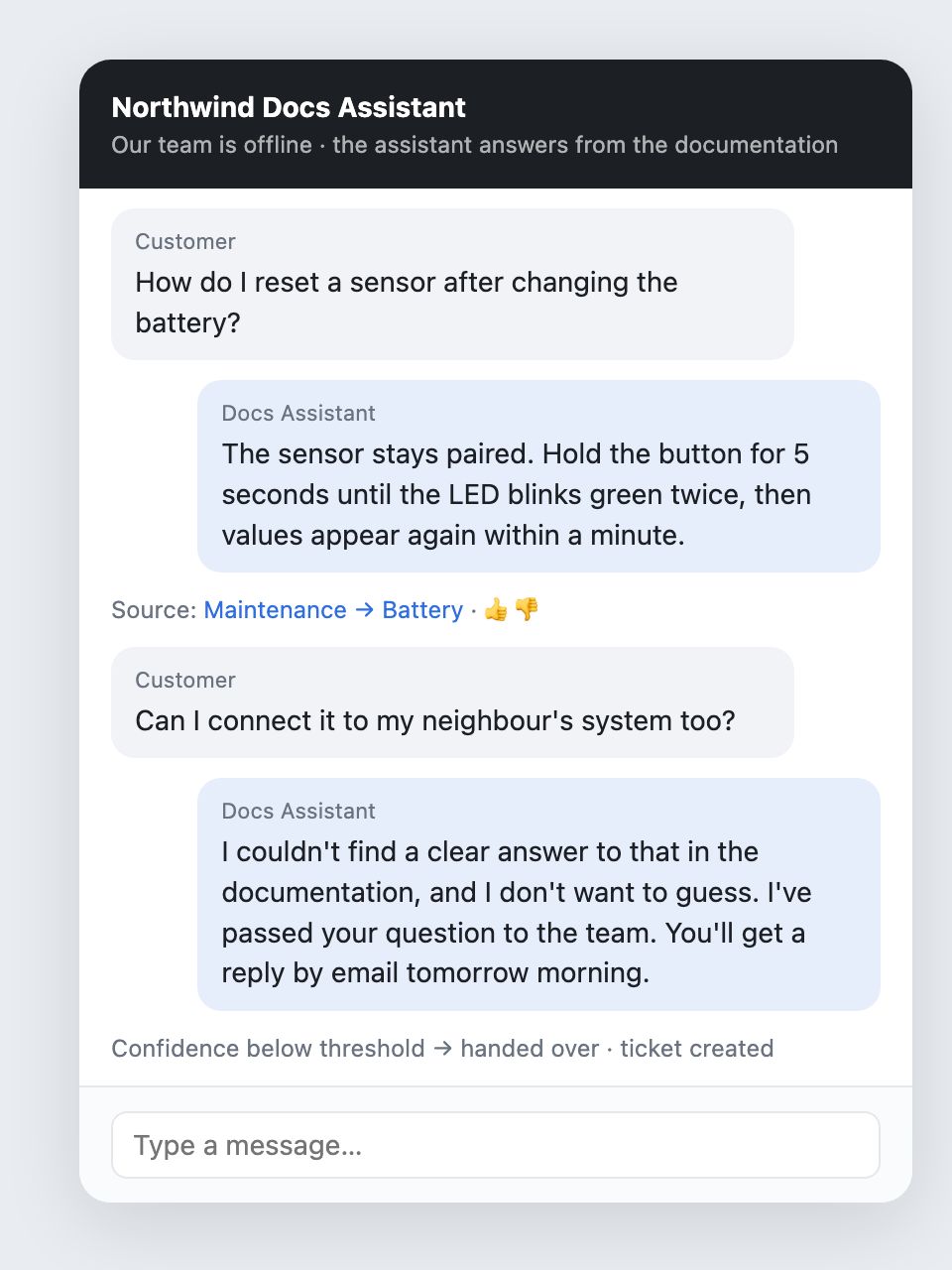
    Decline instead of guess. Before going live, we tested the documentation bot against 200 real support questions. Most answers were partially right, a few were wrong, and one was a proper hallucination. So the bot now has a confidence gate: if the documentation doesn’t clearly cover a question, it says so and hands over. I wrote more about this in Make your AI contradictable.

    The documentation bot answers with a source, and hands over when it isn't sure
    Reconstructed view with made-up data: the real tool looks like this, but every name and number here is invented.

    Speak the customer’s language. Customers describe symptoms; documentation describes features. When we added the documentation’s own vocabulary to each search, the number of customer phrasings the bot could answer roughly doubled in our tests. That’s not a model improvement. It’s a content improvement.

    Every answer can be rated. Thumbs up, thumbs down, with a reason. The ratings don’t just improve the bot, they point at the articles that need work.

    The failure nobody expects

    One more story, because it’s the kind of thing you only learn by running a bot in production.

    On one of its first days, our bot suddenly made hundreds of calls to the chat system within seconds. The cause was a single configuration detail: the bot’s “I can’t help, let me forward you” answer was placed in a spot where the chat system treated it as a new question. The bot answered its own forwarding message, which triggered another forwarding message, and so on.

    Nothing bad happened to customers, and the fix was one line. But it’s a good reminder: a bot is a system that talks to other systems, and those systems have their own logic. Watch it closely in the first weeks.

    Who owns the bot?

    This is the question that decides whether a bot rots.

    The wrong answer is “the person who built it”. That person will move on to the next project, and the bot becomes an orphan.

    The right answer is “the team whose knowledge it serves”. In our case that’s the people who write and maintain the documentation, together with support. They see the thumbs down. They see which questions the bot declined. They fix the articles, and the bot gets better without anyone touching the bot itself.

    A checklist before you launch a bot

    1. Who keeps the knowledge current? Name a team, not a person.
    2. Human first or bot first? Decide deliberately, per channel.
    3. One job per bot. Separate bots for separate purposes.
    4. A confidence gate. Decline instead of guess.
    5. Ratings with reasons, routed to the people who own the content.
    6. Watch the first weeks closely. Bots talking to systems do surprising things.

    A chatbot doesn’t rot because the technology gets worse. It rots because nobody feels responsible for what it knows. Solve that, and the technology is the easy part.

  • I can’t code. I host everything on Cloudflare anyway.

    I can’t code. I host everything on Cloudflare anyway.

    Let me start with a confession: I am not a developer. I can write basic HTML, I can make a page look decent with CSS, and I know roughly what a database is. That’s it.

    Still, as of this week, I run six sites and small apps on my own domains. There’s a personal finance dashboard with a database behind a login. There’s a tool that collects charging sessions from a family’s wallbox and produces monthly receipts. There are two websites for local clubs, a personal landing page, and the blog you’re reading right now. All of them live on one Cloudflare account.

    I didn’t write the code. AI coding agents did, mainly Claude Code and Codex. What I did was decide what I wanted, check what came back, and pick a hosting setup that someone like me can actually understand and keep running. This post is about that last part, because it matters more than people think.

    The real problem isn’t writing code

    If you’re a marketer playing with AI agents, you quickly notice that getting code written is no longer the hard part. You describe what you want, and a few minutes later something works on your laptop.

    The hard part comes next. Where does it run? Who patches the server? What happens when it breaks at 11 pm? How do I stop the whole internet from seeing my finance data? Classic web hosting answers those questions with things I can’t do: SSH into servers, configure Nginx, renew certificates, update PHP, manage database backups.

    What I needed was a setup where the agent can do the work and I can still understand what’s going on.

    What I actually use

    Everything follows the same simple pattern:

    • Workers with static assets. Each site is a folder of plain HTML, CSS and a bit of JavaScript, plus a small script (a “Worker”) that runs on Cloudflare’s network. No server I have to maintain.
    • D1 for the databases. It’s SQLite under the hood, which means the data is one file I could download and open myself if I wanted to.
    • R2 for files, such as the photo uploads on a club site or the images on this blog.
    • Cloudflare Access to put a login in front of anything private. My finance app is only reachable after an email code to my own address, and I didn’t have to build a login system to get that.
    • DNS in the same place. The domains already sit at Cloudflare, so connecting a new subdomain to a Worker is one line in a config file.

    And the most important bit: all of it is described in files inside the project. There’s a config file per project that says which database, which storage bucket and which domain it uses. Deploying means running one command. No clicking around in dashboards that nobody remembers a week later.

    Why this fits a non-developer so well

    One place, one bill, mostly free. My sites don’t get millions of visitors. The free tier covers almost everything, and if I ever outgrow it, the paid Workers plan starts at five dollars a month. I don’t have five hosting providers with five logins and five invoices.

    Nothing to patch. There’s no operating system under my sites that I’m responsible for. That alone removes the scariest class of problems for someone like me.

    Agents understand it. This is the part that surprised me. Because the whole setup is files (a config, a database schema, a folder of pages), an AI agent can read it, change it and deploy it. When I ask “add a page that shows last month’s charging sessions”, the agent knows where the database is, how it’s structured and how to ship the change. A hosting setup that lives in a web dashboard is invisible to the agent. A setup that lives in files is something the agent can work with.

    Rollback is built in. Every deploy is a version. When something breaks, going back takes a single command. For two club websites I even left the old hosting running in parallel: the Worker simply sits in front of it. If I remove one route, the old site is live again. That’s the kind of safety net you want when you’re not sure you know what you’re doing.

    Security I didn’t have to build. Putting Access in front of an app took one setup step. Building a secure login myself (or rather, trusting an agent to build one) would have been a much bigger risk.

    What went wrong (so you don’t have to repeat it)

    It isn’t magic. A few things bit me, and all of them are now written down in the projects so that neither I nor the next agent falls for them again:

    • Two accounts, one mistake. I have a work Cloudflare account and a private one on the same laptop. An agent once created a database in the wrong account because the tool it used was connected to the work account. Now every private project has the private account ID written into its config, so a deploy to the wrong account simply fails.
    • “Auto deploy” didn’t deploy. One site was supposed to redeploy on every push to GitHub. It silently stopped doing that. The fix wasn’t technical, it was a habit: after a change, check which version is live.
    • A login that wasn’t a login. On one app, Cloudflare served the HTML files directly, before my login check ever ran. The data behind it was protected, but the page itself wasn’t. One setting (“run the Worker first”) fixed it. You only find this kind of thing by testing like an outsider.
    • Error messages lie sometimes. Once the deploy tool claimed I wasn’t logged in. I was. A plugin had created a folder that confused it. An agent found that in minutes. I would have needed days.

    The bigger point

    For decades, “I’m not technical” meant “I need someone from IT or an agency for that”. With AI agents, that’s changing, but only if the platform underneath is simple enough that you can keep an overview. For me, that platform is Cloudflare. For you, it might be something else.

    My rule of thumb: pick a platform where your whole setup can be written down in plain files. Then both you and your agents can read it. That’s what turns “the agent wrote me some code” into “I run this thing myself”.

    This blog, by the way, is my latest experiment. It runs on EmDash, a new open-source CMS that runs on Cloudflare, and I’m testing it as a WordPress alternative. More on that once I’ve lived with it for a while.

  • Make your AI contradictable

    Make your AI contradictable

    A few weeks ago our AI-graded chat reports had a problem. Every morning, the report flagged a handful of “missed sales opportunities” in our live chats. And every morning, our sales team looked at them and said: no, that wasn’t an opportunity. That customer already had a partner. That question was purely technical.

    The AI wasn’t stupid. It was confidently wrong in the same way every day, because nothing told it otherwise.

    That’s the moment I understood the most important design rule for AI reports in marketing: an analysis nobody can contradict repeats its mistakes every day.

    Thumbs down, with a reason

    The fix was almost embarrassingly simple. Every AI grade in our reports now has a thumbs up and a thumbs down. The thumbs down has one condition: you have to write a reason. One sentence is enough. “Customer already works with a partner.” “This was a support question, not a sales lead.”

    The next day’s run reads those reasons before it grades anything. The mistakes don’t disappear overnight, but they stop repeating. And, just as important, the sales team stopped ignoring the report, because they now had a way to shape it.

    Two things I learned about this:

    A graded chat with a thumbs down and a written reason
    Reconstructed view with made-up data: the real tool looks like this, but every name and number here is invented.
    • The reason matters more than the vote. A thumbs down on its own tells the AI that it was wrong, but not why. Without the why, it just gets more cautious everywhere.
    • Feedback is also a trust signal. People trust a report they can argue with far more than a polished one they can’t.

    Don’t let the AI invent categories

    The second lesson came from topic labels. We categorise every chat and ticket by topic, so we can see what customers ask about most. For one run, I gave the AI sub-agents a list of example topics to help them along.

    They took it as inspiration. We got back fifteen new, invented labels, all slightly different, that I then had to map back to our real categories by hand. A trend chart built on labels that change from run to run is worthless.

    The rule now: the labels are a closed list. If a conversation doesn’t fit, the sub-agent answers “other” and adds a suggestion. At the end of the run, the main session looks at all suggestions at once and decides whether a new label is worth adding. Of the first eight suggestions, three became real labels. The other five were variations of existing ones.

    If you want to compare numbers over time, the AI may fill in categories, but it must not define them.

    Decline instead of guess

    We also built a documentation bot that answers product questions from our knowledge base. Before letting it near customers, we tested it on 200 real questions from support tickets and had another model judge the answers.

    The result was sobering and useful. Only a small share of answers were fully correct. Most were partially right: helpful for pointing someone to the right article, but incomplete. A few percent were wrong, and one was a proper hallucination: a command that doesn’t exist.

    We didn’t give up on the bot. We changed its job. It’s now a documentation navigator, not a support replacement. And we added a confidence gate: if the retrieved documentation doesn’t clearly cover the question, the bot says it doesn’t know and hands over. An honest “I don’t know” is worth more than a fluent wrong answer.

    A documentation bot that declines and hands over instead of guessing
    Reconstructed view with made-up data: the real tool looks like this, but every name and number here is invented.

    The same principle applies to our analysis tools. One of our rules for the documentation gap report: never claim something is “not documented” without searching for it with at least two different phrasings. Customers and documentation writers rarely use the same words.

    Stop, don’t invent

    Many of our reports run automatically every morning, with nobody watching. That makes one rule non-negotiable: if data is missing or a connection fails, the run stops and says so. It does not fill in the gaps with plausible numbers.

    This sounds obvious. It isn’t. A language model’s instinct is to be helpful, and “helpful” with missing data means making something up. You have to tell it, explicitly and in writing, that an aborted report is better than an invented one.

    Keep the evidence next to the verdict

    The last pattern is the simplest. Every grade, every flagged ticket, every content idea in our tools links back to the source: the full chat transcript, the actual ticket, the real Instagram comments an idea was based on. Anyone can click through and check.

    This does two things. It makes mistakes visible fast. And it keeps humans in the habit of looking at the real conversations, which is where the actual insight is anyway.

    A checklist for your own AI reports

    If you’re building AI-assisted reports in marketing, here’s what I’d put in from day one:

    1. A thumbs down that requires a reason, and a next run that reads it.
    2. Closed lists for anything you want to count over time. “Other plus a suggestion” instead of invented labels.
    3. A confidence gate. Decline instead of guess.
    4. Abort on missing data. Written into the instructions, not assumed.
    5. Evidence next to every verdict. A link to the source, always.

    None of this is about better models. It’s about making the AI’s work something people can check, argue with and improve. That’s what turns an impressive demo into a tool a team actually relies on.

  • Your best-performing post is lying to you

    Your best-performing post is lying to you

    “Which of our posts work best, and what should we do more of?”

    It’s the most natural question to ask an AI about your social media. It’s also a question where the AI can be completely, confidently wrong, and give you recommendations that point in exactly the wrong direction.

    It happened to us. Here’s how, and the rules we now follow.

    The quarter that wasn’t

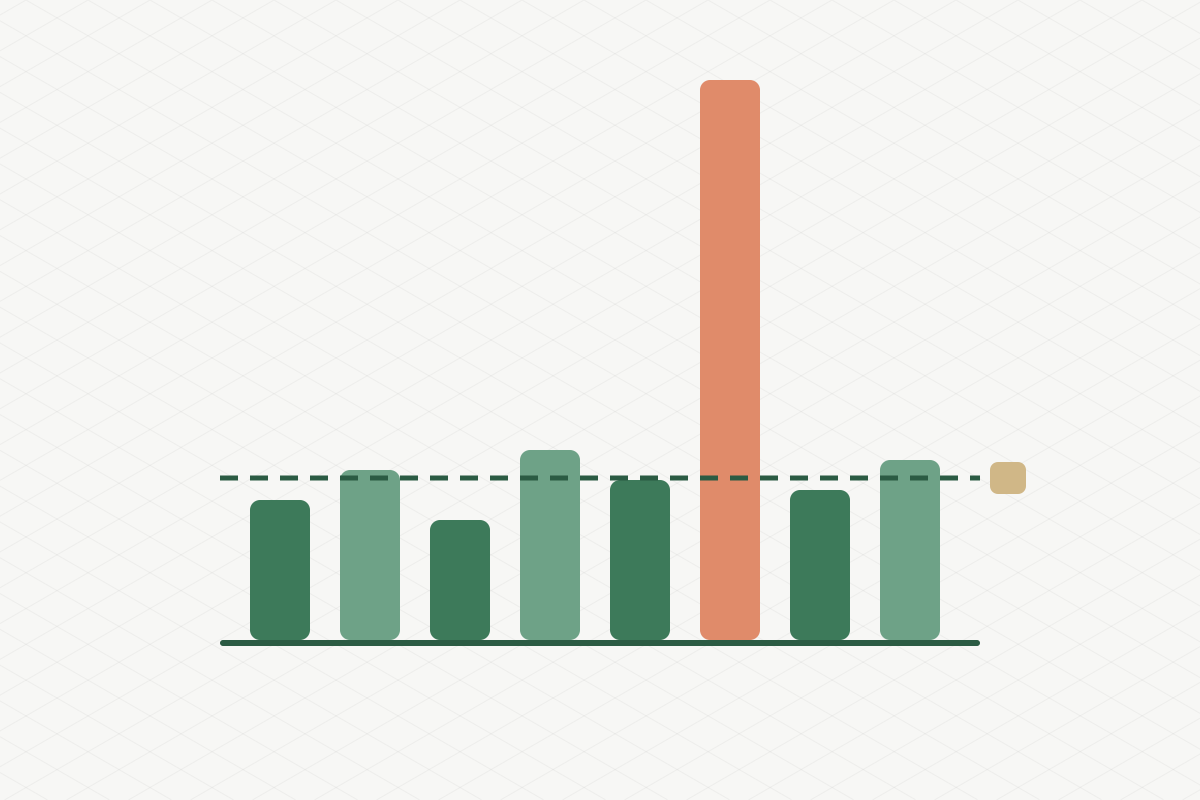
    When I first had an agent analyse our YouTube and Instagram performance, the results looked great. One quarter stood out as our strongest by far, with average views per video many times higher than any other quarter. The AI’s recommendation: do more of what we did then.

    The problem: that quarter included two big campaign films with serious media budget behind them. They weren’t “performing”. They were paid to be seen. Once we took them out, the average for that quarter dropped by roughly a factor of ten, and it turned out to be our weakest quarter, not our best.

    Every recommendation built on the first version would have been wrong. And it would have looked perfectly plausible, with charts and all.

    Rule 1: separate paid from organic before you rank anything. Not as a footnote, not as a filter you can optionally apply. As the first step, every time. We now call it our iron rule, and it’s written into the analysis instructions so no agent can skip it.

    One outlier makes everything else look bad

    Even after removing campaigns, we hit a second problem. One promoted video had so many views that, compared with it, every normal video looked tiny. In a ranking based on averages, a regular good video looked more than a hundred times worse than the leader. That’s not insight, that’s noise.

    We switched to medians. The median tells you what a typical post does. It doesn’t care about the one post that went viral or got a boost. Suddenly the differences between formats and topics became visible again: which kinds of posts reliably do a bit better, which reliably do a bit worse.

    Rule 2: use the median for “typical”, and look at outliers separately. Outliers are interesting. They just shouldn’t define your baseline.

    Not all “engagement” is the same

    Different platforms count different things. On one network, the analytics tool’s “engagement” included link clicks; on another, it didn’t. Put them side by side and one platform looks far more engaging than the others, for purely technical reasons.

    Rule 3: compare within a platform, not across platforms, unless you’ve checked that the numbers mean the same thing.

    One metric, three definitions

    The same problem exists inside companies. For one of our core business metrics, we found three different definitions in circulation, in three different slide decks. Each one was defensible. Together they meant that every meeting started with a debate about whose number was right.

    We fixed it by writing the definition down once, in a single place, and building a small tool that calculates it live from the CRM. Nobody has to agree with the definition forever. But everyone uses the same one until it’s changed, in that one place.

    Rule 4: every metric has exactly one written definition. Especially when an AI is doing the calculating. It will pick whichever definition it finds first.

    Watch the small print

    A few more traps we’ve run into:

    • Currencies. Comparing partner revenue across countries against a single threshold made partners in countries with a different currency look many times bigger than they were. Always convert before you compare.
    • Auto-replies. “Replied to 95% of messages” can mean “sent an automatic message to 95% of people”. Look at how fast the replies came.
    • Privacy in the data. Some analytics exports include profile image links with access tokens in them. Strip those before anything gets stored or shown.

    Let the AI do the counting, not the thinking

    None of this means AI is bad at analytics. It’s excellent at the tedious parts: pulling data from APIs, cleaning it, scoring the sentiment of thousands of comments, drafting content ideas that link back to the real posts and comments they came from.

    But it has no idea that a post was paid for, that a platform counts differently, or that your business uses a metric in a particular way. It will produce a beautiful, confident report either way.

    So the checklist is short:

    1. Paid out first. Always.
    2. Medians for the baseline, outliers on their own.
    3. Compare like with like.
    4. One definition per metric, written down once.
    5. Read a few of the top posts yourself before you believe the ranking.

    Your best-performing post might really be your best. Just make sure it earned it.